Excel vs Construction Management Software: When Does Excel Stop Being a Tool and Start Becoming a Risk?
Excel is one of the most useful business tools ever created.
It’s flexible, familiar and capable of managing an extraordinary amount of information. For a small construction business or an individual project, a well-designed spreadsheet can be an effective way to manage budgets, estimates, costs and other project information.
So the argument isn’t that construction businesses shouldn’t use Excel.
The more important question is:
At what point does relying on spreadsheets to manage your construction business start creating more risk than efficiency?
For growing builders, contractors and developers, that point can arrive when spreadsheets stop being supporting tools and become the system holding critical project information together.
Why Construction Businesses Rely on Excel
It’s easy to understand why spreadsheets become embedded in construction businesses.
They’re readily available. Most people know how to use them. They can be customised quickly and don’t require a lengthy implementation process.
Need a variation register? Build a spreadsheet.
Need to monitor project costs? Create another.
Cash flow forecast? Another spreadsheet.
Subcontractor tracking? Another.
Before long, a business may have spreadsheets managing:
- Estimates and budgets
- Purchase orders
- Project costs
- Variations
- RFIs
- Subcontractors
- Progress claims
- Cash flow
- Forecasting
- Timesheets
- Project reporting
Individually, each spreadsheet may work perfectly well.
The problem emerges when all of those spreadsheets need to work together.
When Spreadsheets Become Disconnected
Construction projects generate information continuously.
A purchase order affects committed costs. A variation can affect the contract value and project margin. A subcontractor claim changes actual costs. Site activity affects progress. Changes in project costs affect forecasts and potentially cash flow.
When these processes are managed across separate spreadsheets, someone often needs to manually move, reconcile or interpret information between them.
That’s when questions begin appearing:
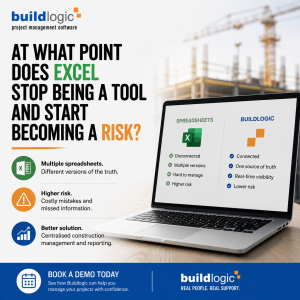
Which spreadsheet is current?
Who updated this figure?
Has that variation been included?
Does accounts have the same number as the project manager?
Has this purchase order been allowed for in the forecast?
The issue isn’t necessarily that the information doesn’t exist.
The issue is knowing whether everyone is working from the same information.
The Risk of Multiple Versions of the Truth
One of the biggest challenges with spreadsheet-dependent project management is version control.
Files get downloaded.
Copies get emailed.
Someone saves a new version.
Another person updates the old one.
A formula gets changed.
Information is entered into one spreadsheet but not another.
Suddenly, project management, estimating, accounts and senior management can each be looking at slightly different versions of project performance.
For construction businesses operating across multiple projects, those differences can become increasingly difficult to identify.
And when you’re making decisions about costs, margins, cash flow and future commitments, having confidence in the underlying information matters.
Growth Magnifies the Problem
A spreadsheet system that works for three projects may become considerably harder to manage across ten, twenty or fifty projects.
More projects generally mean more:
- Employees
- Subcontractors
- Purchase orders
- Variations
- Progress claims
- Documents
- Site activity
- Financial transactions
- Reporting requirements
- Management decisions
The volume of information increases, but so do the relationships between different pieces of information.
This is where construction businesses may need to reconsider the question:
“Can Excel manage this?”
and instead ask:
“Is Excel still the best system for our business to manage this?”
What Changes With Construction Management Software?
Dedicated construction management software is designed to connect the different processes involved in delivering construction projects.
Rather than maintaining isolated information across multiple spreadsheets, project information can be managed within a centralised environment.
Buildlogic, for example, brings together key areas of construction management including:
Project Management
Manage jobs, RFIs, extensions of time and other project information within the same construction management environment.
Budget and Cost Management
Connect estimating, budgets, purchase orders, adjustments, progress claims and project costs to gain greater visibility over financial performance.
Variations and Contracts
Manage contracts and variations alongside the project information they affect rather than maintaining separate registers that need to be reconciled manually.
Financial Management and Forecasting
Monitor financial information, forecasting and reporting to better understand where projects are heading—not simply what happened last month.
Subcontractor Management
Connect contractor information, contracts and variations, with the optional Buildlogic Subbie Portal extending the flow of information between your business and subcontractors.
Document Management
Manage plans and documents through centralised registers so teams can more easily access the information relevant to their projects.
Site Management
Connect information from the site with the wider project through timesheets and optional mobile site-management functionality.
From Spreadsheets to a Single Source of Project Information
The objective isn’t necessarily to eliminate Excel from your business.
There will always be situations where spreadsheets are useful for analysis, modelling and ad hoc calculations.
The difference is what you rely on Excel to do.
Instead of using spreadsheets as the primary system connecting critical project information, dedicated construction management software can become the central source from which teams manage projects and make decisions.
Excel can then return to what it does particularly well: being a flexible analytical tool rather than carrying the operational weight of an entire construction business.
Reporting Without Rebuilding the Spreadsheet
Reporting is another area where spreadsheet dependence can create unnecessary work.
A construction business may export information, manipulate it in Excel, create a pivot table, format a management report and repeat the same process the following week or month.
The moment information is exported, however, that report represents a snapshot.
The underlying project continues to change.
Buildlogic’s Report Builder allows users to create reports and dashboard widgets using current information already contained within the Buildlogic platform.
Teams can create different views of datasets including jobs, purchase orders, progress claims, cost-to-complete forecasts and timesheets against budget.
Reports can then be configured as tables, charts, progress bars, ranked lists or pivot tables depending on the question being asked.
The goal is to spend less time rebuilding reports and more time interpreting what the information is telling you.
Better Visibility Becomes More Important as Margins Tighten
For Australian construction businesses, visibility is particularly important when project costs, cash flow and margins are under pressure.
A spreadsheet may tell you what you’ve entered into it.
A connected construction management platform can help you understand how different parts of the project relate to each other.
What was budgeted?
What has been spent?
What has already been committed?
What has changed?
What is still outstanding?
What does the forecast final cost look like?
Where is the project heading?
Those are the questions that help construction businesses move from historical reporting towards proactive project management.
Is Your Construction Business Ready to Move Beyond Spreadsheets?
There isn’t a particular number of employees, projects or dollars of revenue that determines when a business should move from spreadsheets to construction management software.
Instead, look for the operational signs.
If your team regularly asks which spreadsheet is current, manually transfers the same information between systems, spends significant time preparing reports, struggles to see committed costs or relies on individuals to piece together project performance, it may be time to reconsider your systems.
The question isn’t whether Excel is good enough.
Excel is an exceptionally capable tool.
The question is whether your construction business has reached the point where the information your team relies on needs to be connected.
One Business. One Bigger Picture.
As a construction business grows, visibility becomes increasingly important.
Buildlogic is Australian-developed construction management software designed to bring project, budget, financial, contractor, document and site information together.
Rather than replacing one spreadsheet with another disconnected application, Buildlogic helps create a more connected view of your construction projects and business.
Because the bigger your business becomes, the more important it is that everyone is working from the same picture.
Ready to Look Beyond the Spreadsheet?
See how Buildlogic can help centralise your construction project information, improve visibility and reduce reliance on disconnected spreadsheets.
Book a personalised Buildlogic demonstration today.